So this will evolve over time as I add more to it and organize it
Brownfield Import of multiple vCenters\Clusters
To do a brownfield import of an existing set of vCenters. The vCenters need to be colocated with the hosts it manages.
So having 2 vCenters with both in one cluster will work for the first vCenter, but will fail for the second.
Reverse DNS Error during deployment validation
If you receive the following error when there is a child domain involved, please verify conditional forwarders are working in both directions.
“Reverse DNS Lookup failed for IP ___. Unknown IP or record mismatch.
Remediation: Provide valid FQDN {1} for IP ___”
DNS/FQDN Mismatch
DNS and hostnames names should be in lowercase whenever possible. From what I’ve learned with Linux systems, they tend to care much more about the case of letters in names, paths and such.
VMware software runs on Linux and the same principle applies.
Windows Admins (I’m guilty of this as well) will commonly use all caps for names and records.
Please try to use all lowercase for both names and DNS to minimize issues.
Fresh ESX 9 install must use a certificate that includes its name
When freshly installed. ESX will use a cert with the name localhost. This will fail the validation check with the VCF installer. Please use the following KB to generate a self-signed cert that meets requirements.
While a proper cert can be provided, the installation for VCF will replace the cert as it builds the environment.
Regenerate the Self-Signed Certificate on ESX Hosts
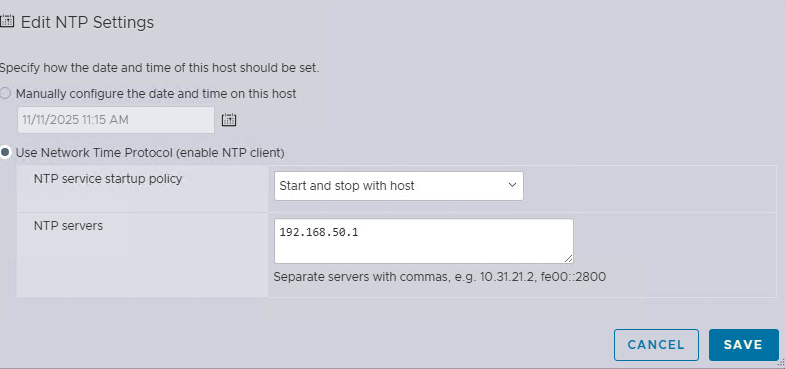
Configure NTP on newly installed ESX hosts
When doing the deployment validation pre-checks. NTP configuration and drift from the installer will be checked. In the ESXi Host Client, please configure at least 1 NTP server and set the service to start\stop with host, go to Manage -> Services, select ntpd and start the service